You removed the background from a product photo and now you have a decision to make: keep it transparent, or flatten it onto white?
Most advice treats this as a matter of taste. It isn't. Get it wrong on the wrong platform and your image does not just look slightly off, it can render with a black background, or get your listing suppressed. Those are the actual failure modes, and they are documented by the platforms themselves.
Here is what each major marketplace officially asks for, and how to decide.
First, the Technical Reason This Matters
There is one fact underneath every rule below, and it explains most of the confusion.
Per MDN's image format documentation:
"JPEG does not support an alpha channel."
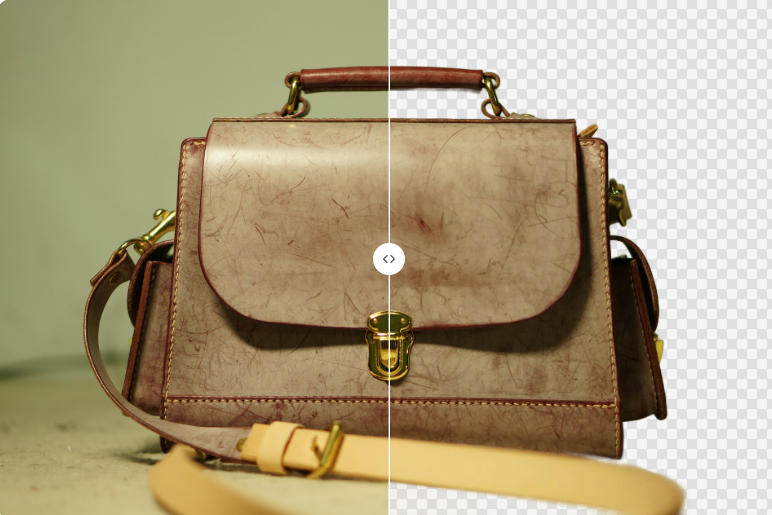
An alpha channel is what stores transparency. PNG has one, JPEG does not. So when you export a cut-out as JPEG, the transparency has to go somewhere, and it gets flattened onto a background color. When you export as PNG, the transparency is preserved as actual data in the file.
That leads to the failure that surprises people. If you upload a transparent PNG somewhere that does not handle alpha channels, the transparent pixels do not politely become white. They commonly render as black, because that is what an empty alpha channel looks like when it is composited without instructions.
MDN also notes that PNG is preferred "when transparency is needed," which is the useful framing. Transparency is a feature you use deliberately, not a default state you leave your files in.
What Each Platform Officially Requires
Amazon: pure white, no ambiguity
Amazon is the strictest of the major marketplaces. Its official seller guidance states:
"In most cases, product shots should be taken against a white background (RGB color values: 255, 255, 255)."
Not off-white, not light grey. The specific RGB value is named. Amazon accepts JPEG, TIFF, PNG, and non-animated GIF, and requires images to be 500 to 10,000 pixels on the longest side.
Note the gap here: Amazon accepts the PNG format, but we could not find official documentation on how it treats an alpha channel in an uploaded PNG. Accepting the file format and handling transparency are two different statements. Do not assume the second one follows from the first.
Amazon's full image rules go well beyond background color, including an 85% frame fill requirement that is widely misreported as 80%. They are covered in Amazon product image requirements.
Walmart: same answer, same specificity
Walmart Marketplace requires main images on:
"Seamless white (255/255/255 RGB)"
It accepts JPEG, JPG, PNG, and BMP, with GIF not permitted. Main images also cannot contain graphics, logos, watermarks, or text, and images below 500x500 are removed automatically.
Two of the biggest marketplaces in the US, then, name the identical RGB value. If you sell on both, that is one export setting, not two.
eBay: white recommended, not required
eBay is notably more relaxed, and says so plainly:
"White backgrounds are generally best, but for shiny or reflective items like a piece of jewelry, a darker background may work better"
That is guidance, not a rule. eBay also builds a background tool into its own listing flow:
"Select the Background icon to automatically replace the background with a solid white color."
So on eBay you have room to make a judgment call, and a built-in fallback if you would rather not think about it.
Etsy: the one that trips people up
Etsy has no hard background requirement. Its guidance on backgrounds is aesthetic, suggesting clean, white or neutral, and consistent across your shop.
But Etsy's image documentation contains a specific and easily missed warning:
"Animated .gif files & transparent .png files are not supported. If a file contains transparency, the transparent parts of the image will appear black on Etsy."
Read that twice if you sell on Etsy. Transparency does not get filled with white. It renders black. A cut-out product that looked clean in your file browser can appear on your shop as a product floating on a black rectangle.
This is the single most consequential item in this entire article, because it is a silent failure. Nothing rejects your upload. It just looks wrong to every customer who sees it.
Google Merchant Center: both allowed, with one trap
Google is the most permissive of the group, and the only one that explicitly endorses transparency:
"Use a solid white or transparent background."
So if you are running Shopping ads, a transparent PNG is not a workaround, it is an officially sanctioned option. Google also accepts lifestyle imagery:
"Staged or lifestyle images that clearly show the product are also acceptable."
But there is a specific exception worth memorizing:
"Don't use a transparent background for images with light colors because they might show with a black background."
Same failure mode as Etsy, narrower scope. A white sneaker, a cream handbag, a silver appliance: these are exactly the products where transparency backfires, because the product itself is light and the fallback composite is dark.
Shopify: no rule at all
This one is a common misconception. Shopify's official product media documentation covers file formats, dimensions, and aspect ratios, and says nothing about backgrounds or transparency.
That is not an oversight. Shopify is storefront software, not a marketplace, so background consistency is a design decision your theme makes, not a policy you have to satisfy. If your theme has a white product grid, transparent PNGs will look seamless. If it has a dark or colored section, transparency is an advantage, because the same file adapts.
Stock sites: two opposite answers
If you also license images, the two largest platforms disagree:
- Shutterstock does not accept PNG for submission at all, stating it will not offer PNG "for download with other content types, nor will they accept these file formats for submission." Submissions are JPEG and TIFF.
- Adobe Stock maintains a dedicated technical requirements page specifically for PNG submissions with transparency, which means cut-outs are a supported content type there.
We could not read Adobe's page directly to quote it, so treat that as a pointer to check rather than a quoted rule.
The Summary Table
| Platform | Official background requirement | Transparent PNG |
|---|---|---|
| Amazon | Pure white, RGB 255,255,255 | Format accepted; alpha handling not documented |
| Walmart | Seamless white, 255/255/255 | Format accepted; alpha handling not documented |
| eBay | White recommended, not required | No official statement found |
| Etsy | No hard requirement | Not supported, renders black |
| Google Merchant Center | Solid white or transparent | Allowed, except for light-colored products |
| Shopify | None | Fine, depends on your theme |
| Shutterstock | N/A | PNG not accepted for submission |
| Adobe Stock | N/A | Dedicated PNG submission path exists |
Where this table says documentation was not found, that means exactly that. It does not mean the behavior is undefined, it means we could not verify it from an official source and neither should you assume it.
So Which Should You Export?
Here is the decision in practical terms.
Export white-background JPG when: you are uploading a main image to Amazon or Walmart, you are bulk-uploading and want smaller files, or you are publishing anywhere that has not explicitly told you transparency is supported. JPEG's lossy compression makes for meaningfully smaller files at listing-appropriate quality, and there is zero risk of a transparency surprise because there is no alpha channel to mishandle.
Export transparent PNG when: you are placing the product onto a colored banner, a seasonal promo graphic, or a slide, when you are building a Shopify theme section with a non-white background, when you are feeding Google Shopping a non-light-colored product, or whenever the same cut-out has to sit on more than one background color.
The rule of thumb: transparency is for images you are going to composite again later. White background is for images that are finished and going straight into a listing.
The Workflow That Avoids This Entirely
The reason this question causes trouble is that people treat it as one-or-the-other, when the actual answer is to cut once and export twice.
With BatchRemover, you choose your export format after the background is removed, not before. Same cut-out, download it as a transparent PNG for your banner work and as a white-background JPG for your marketplace listings. Single images are free and no account is required, so you can test what a given platform does with your file before you commit a whole catalog to it.
If you want the white version specifically, you can change the background to any solid color including pure white, which is what Amazon and Walmart are asking for. If you want the transparent version, make the image transparent and keep the alpha channel intact. There is a step-by-step walkthrough in how to change an image background to white.
For a catalog rather than a one-off, bulk background removal applies the same export setting across the whole set, which matters because mixed formats within one listing are how half of these problems start. There is a fuller product-photo walkthrough in our Shopify and Amazon guide.


Drag and drop images or folders
Before You Upload Anything
Three checks that take under a minute and prevent the failures above:
- Open the file on a dark background before uploading. Drag it onto a black slide or view it in an image viewer with a dark theme. If you see the product floating on black where you expected white, you have a transparent PNG and you were about to find out the hard way.
- Flatten to white yourself rather than hoping the platform does it. No platform we checked documents automatic white-filling of transparent uploads. Since nobody promises it, do not rely on it.
- Check the longest side. Amazon wants 500 to 10,000 pixels, Walmart auto-removes anything under 500x500. If your background remover downsized your image on the way out, you can satisfy every background rule perfectly and still get pulled for resolution.